Give Every Character Their Own Voice: Multi-Voice Narration for AI Stories
A single narrator reading every line is fine for a novel. For a children’s story, a radio-style drama, or anything with three characters arguing in one scene, it falls flat. This guide covers how to cast, generate, and assemble a separate AI voice for each character — without an actor, a studio, or more than an afternoon.
Why One Narrator Isn’t Enough
On the page, the reader always knows who is talking: the dialogue tag says so. In audio, tags are noise. “Said Pip” after every line is exhausting to listen to, but drop it and a single voice makes three characters sound like one person talking to themselves. Distinct voices solve this: the listener identifies the speaker in the first half-second, the tags can go, and the scene moves at the speed of real conversation.
It also changes how the story is written. Once you know each character will be heard, you start giving them different rhythms, vocabulary, and sentence lengths — the same discipline covered in Building Compelling Characters, now with a practical payoff.
Step 1: Build a Voice Casting Sheet
Before generating anything, write down who speaks and how. A casting sheet is one line per character: role, a two-or-three-word voice direction, and the pitch and pace you will use. It stops you from re-deciding the villain’s voice every chapter, and it is what keeps a character consistent across a whole book.
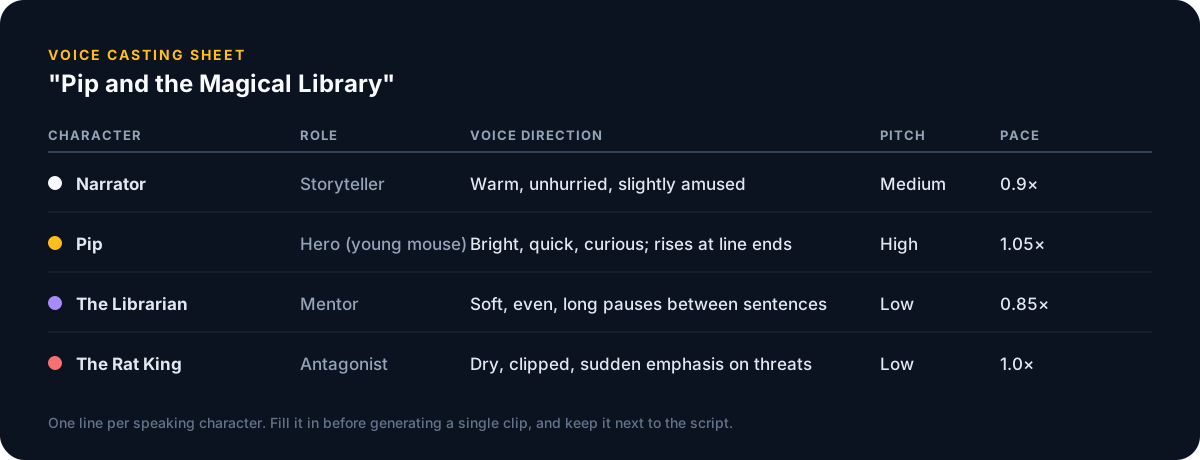
- Cast by contrast. If the hero is high and quick, make the mentor low and slow. Two similar voices in one scene is the most common mistake.
- Give the narrator the most neutral voice in the cast. Everyone else should be heard as a departure from it.
- Limit yourself to four or five voices per story. Listeners lose track beyond that, and so will you.
- Write the direction in behaviour, not adjectives: "rises at line ends" is more useful than "cheerful".
Step 2: Split the Script by Speaker
Turn the prose into a script: every line of dialogue gets the speaker’s name in front of it, everything else belongs to the narrator. Strip the dialogue tags while you are at it — the voice is the tag now. A short passage ends up looking like this:
NARRATOR:   Pip crept between the shelves, whiskers twitching.
PIP:        Who's there?
LIBRARIAN:  Only a reader, child.
RAT KING:   And a thief, I think.
NARRATOR:   The Librarian sighed.
PIP:        I'm not afraid of you.
Shortcut: ask the story generator for “screenplay format with speaker names, no dialogue tags” and it will produce this layout directly. The AI script generator gets you close: speaker names before each line, with scene headings you relabel as narration.
Step 3: Generate Each Voice
Work one character at a time, not one line at a time. Collect all of Pip’s lines for the chapter, generate them with Pip’s voice and settings from the casting sheet, export, then move to the next character. For the voices themselves we use AnyVoice, an AI voice generator with enough distinct voices to cast a full scene, plus the pitch and speed controls the casting sheet depends on. Any generator with per-voice settings will work; the discipline is the same.
Do
- Audition each voice on the character’s angriest line, not their calmest — that is where voices break.
- Save the exact voice name and settings in the casting sheet the moment you choose them.
- Generate the narrator last, once you know how much space the dialogue takes.
- Name files by speaker and order:
ch03-012-pip.mp3.
Avoid
- Changing a character’s voice mid-book because a “better” one appeared. Consistency beats quality.
- Pushing pitch to extremes for effect. Anything beyond about ±20% starts to sound synthetic.
- Generating whole scenes in one voice and hoping to fix it later. You will regenerate everything.
- Cloning a real person’s voice without permission — including well-known narrators.
Step 4: Assemble the Scene
Open a free audio editor (Audacity, or any DAW) and give each voice its own track. Place the clips in script order, leave roughly half a second of silence between speakers, and a full second at paragraph breaks. Don’t overlap lines unless the script actually calls for an interruption.
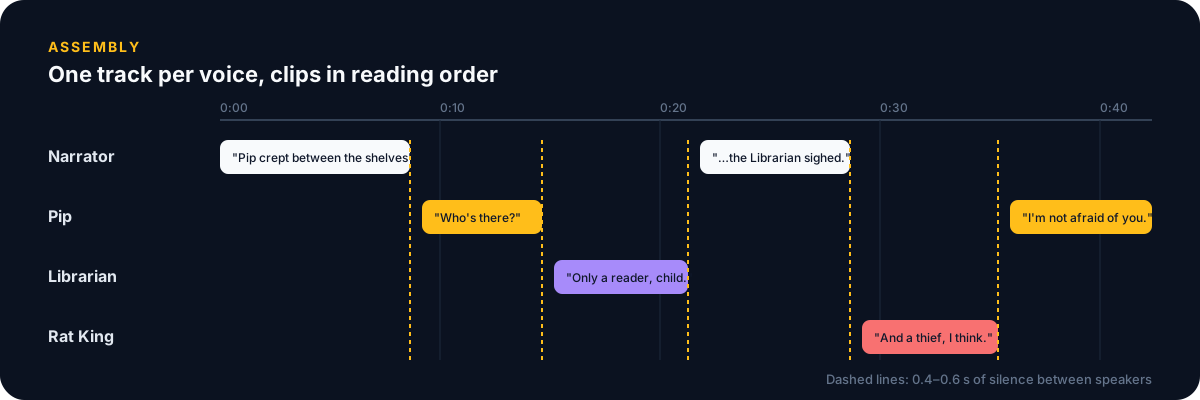
Two finishing touches make a noticeable difference. First, normalise every track to the same loudness — generators vary, and a quiet villain is not menacing. Second, add a light room reverb to all tracks together so the voices sound like they share a space instead of four separate recordings.
When to Stay With One Voice
Multi-voice narration is extra work, and it is not always the right call. Literary fiction with long interior passages, first-person stories, and anything under about five hundred words usually sounds better with a single good narrator — see our guide to turning a story into an audiobook for that workflow. Reach for a full cast when dialogue carries the scene: children’s stories, comedy, mysteries with interrogations, and anything you would describe as a “drama” rather than a “reading”.
The Short Version
- Write a casting sheet: one line per character, cast by contrast.
- Convert the prose to a speaker-labelled script and delete the dialogue tags.
- Generate one character at a time with an AI voice generator such as anyvoice.io, using the settings from the sheet.
- Assemble on one track per voice, normalise loudness, add a shared touch of reverb.
About Story-AI Team
Story-AI is a small, independent product. These guides are written by the people who build it, from what we learn while making an AI story generator.
Continue Reading
How to Turn Your AI-Generated Story Into an Audiobook
A four-step text-to-speech workflow for writers: finish the draft, prepare a narration script, generate the voice, and publish chapter by chapter.
AI TechnologyHow to Make a Story Trailer With AI Image-to-Video
Pick five beats, generate one consistent still per scene, animate each with an image-to-video tool, and cut a thirty-second trailer for Shorts, Reels or TikTok.
Ready to Create Your Own Stories?
Try Story-AI today and experience the future of AI-powered storytelling firsthand.