Du texte généré par IA au livre audio : comment mettre votre histoire en voix
Le livre audio est le format qui progresse le plus vite dans l’édition, et la synthèse vocale a fait tomber le dernier obstacle : plus besoin de studio, de comédien ni de budget. Ce guide décrit la méthode en quatre étapes que nous utilisons pour passer d’une histoire terminée à un MP3 écoutable en moins d’une heure — y compris l’étape de préparation du texte que presque tout le monde saute.
Pourquoi donner une voix à votre histoire ?
Une histoire qui n’existe que sous forme de texte touche les gens qui ont le temps de s’asseoir et de lire. La même histoire en audio touche aussi les gens dans les transports, les enfants au moment du coucher, ceux qui apprennent une langue et tous ceux qui préfèrent écouter. Quand on écrit vite avec un générateur d’histoires IA, l’audio reste le moyen le moins cher de tirer un second format du même travail.
La méthode en quatre étapes
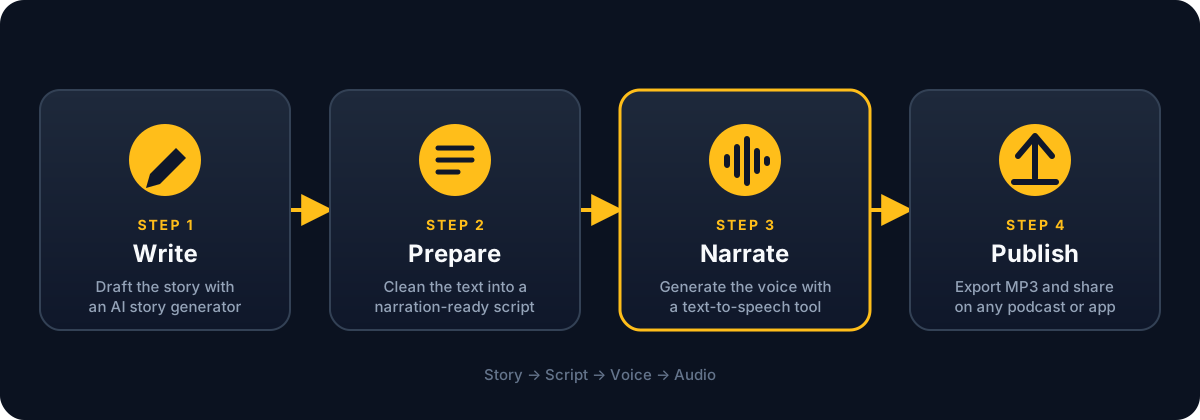
Chaque étape prépare la suivante. L’essentiel de la qualité finale se joue à l’étape deux, bien avant qu’une seule voix soit générée — c’est d’ailleurs là que nous passons le plus de temps.
Étape 1 : terminer l’histoire d’abord
La narration ne pardonne rien. Une phrase que vous survoleriez sur la page devient huit secondes pleines de l’attention de quelqu’un une fois prononcée. Avant de penser aux voix, assurez-vous que le texte est vraiment fini :
- Lisez vous-même la dernière version à voix haute. Là où vous butez, la voix off butera aussi.
- Supprimez les indications que le lecteur accepte mais que l’auditeur n’a pas besoin d’entendre (« dit-elle en levant les yeux »).
- Gardez des incises simples. « Dit-il » disparaît à l’écoute, « s’exclama-t-il, hors d’haleine » non.
- Visez 1 000 à 3 000 mots par chapitre — soit 7 à 20 minutes d’audio à un rythme naturel.
Étape 2 : préparer un script de narration
C’est l’étape qui sépare un audio qui sonne « généré » d’un audio qui sonne produit. Les moteurs de synthèse vocale lisent exactement ce que vous leur donnez : tout ce qui n’a de sens que visuellement doit donc disparaître.
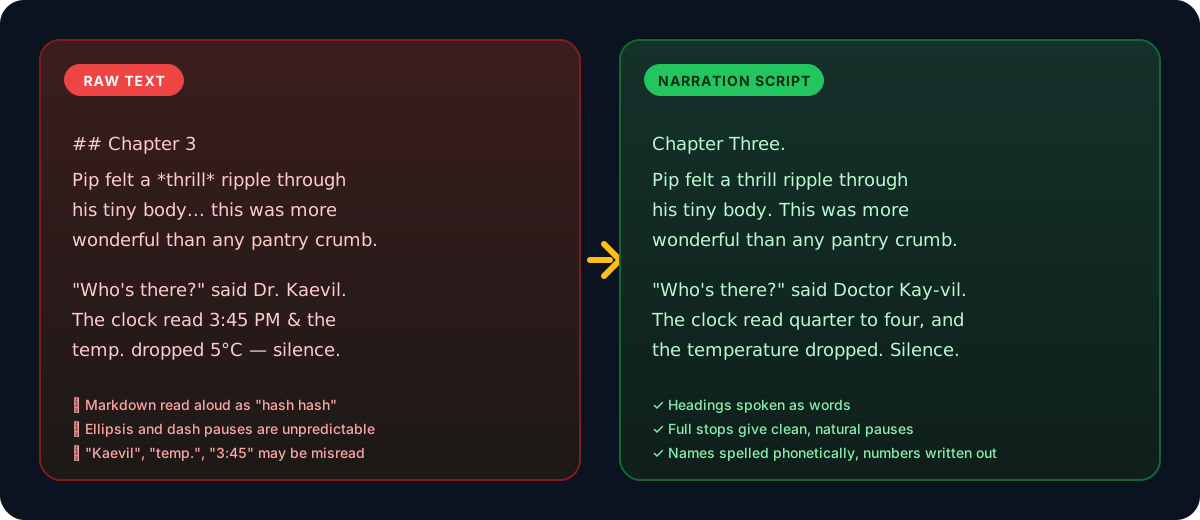
À retirer
- Les symboles Markdown :
#,*,_,> - Les séparateurs de scène comme
***ou--- - Les abréviations que le moteur risque d’épeler : « Dr », « env. », « p. ex. »
- Les chiffres dans les dialogues (« 15 h 45 » → « quatre heures moins le quart »)
À ajouter
- Les titres de chapitre à prononcer : « Chapitre trois. »
- Une transcription phonétique des noms inventés (« Kaevil » → « Ké-vil »)
- Un point là où vous voulez une vraie pause ; les points de suspension sont imprévisibles
- Une ligne vide entre les paragraphes — la plupart des moteurs y entendent une respiration
Raccourci : si vous écrivez l’histoire avec Story-AI, ajoutez « texte brut uniquement, pas de Markdown, nombres écrits en toutes lettres » à votre Prompt. Vous vous épargnerez l’essentiel de ce nettoyage.
Étape 3 : générer la narration
Il ne reste plus qu’à coller le script dans un outil de synthèse vocale. Nous utilisons AnySpeech pour cette étape : le texte collé devient une voix naturelle directement dans le navigateur, plusieurs voix et langues sont proposées, et l’audio se télécharge — ce qui suffit largement à un livre audio. Quel que soit l’outil retenu, les réglages qui comptent sont les mêmes :
La voix
Choisissez la voix en fonction de l’histoire, pas de vos goûts. Les histoires pour enfants supportent des voix chaudes et un peu plus aiguës ; les thrillers, des voix graves et égales. Écoutez le même paragraphe avec trois voix avant de trancher.
Le débit
Les réglages par défaut sont calibrés pour des annonces, pas pour de la fiction. Ralentissez la narration à environ 0,9× — près de 150 mots par minute — pour laisser à l’auditeur le temps de se représenter la scène.
Le découpage
Générez un fichier par chapitre plutôt que le livre entier d’un coup. Chaque export reste léger, une correction ne coûte presque rien, et vous obtenez des repères de chapitre naturels.
Écoutez l’intégralité du résultat une fois, à vitesse normale, avant de publier. Les noms mal prononcés et les pauses étranges se concentrent autour des dialogues et des mots inventés ; corrigez-les dans le script (étape deux) plutôt que de lutter contre le moteur, puis régénérez ce seul chapitre.
Étape 4 : publier
Une fois les fichiers de chapitres en main, la diffusion suit les mêmes règles que n’importe quel autre contenu audio :
| Où | Bon pour | Format |
|---|---|---|
| Votre site ou votre newsletter | Construire une audience directe | MP3 intégré |
| Flux de podcast (Spotify, Apple) | Fiction en feuilleton, un chapitre par épisode | MP3, un fichier par épisode |
| YouTube avec une image fixe | Se faire trouver via la recherche | MP4 (audio + image) |
| Applis pour enfants et histoires du soir | Histoires courtes, écoutées en boucle | MP3, moins de 15 minutes |
Un mot sur les droits : si le texte a été généré par une IA, vérifiez les conditions d’utilisation du générateur employé avant de vendre l’audio. Les histoires écrites avec Story-AI vous appartiennent ; ce n’est pas le cas partout.
En résumé
- Terminez l’histoire et lisez-la une fois à voix haute.
- Retirez le Markdown, écrivez les noms phonétiquement, les nombres en toutes lettres.
- Collez chaque chapitre dans un outil de synthèse vocale comme anyspeech.io, choisissez une seule voix, ralentissez à environ 0,9× et exportez.
- Publiez chapitre par chapitre, là où vos auditeurs se trouvent déjà.
Pas encore d’histoire ? Commencez par le générateur d’histoires gratuit et revenez à ce guide une fois le brouillon terminé.
À propos de Équipe Story-AI
Story-AI est un petit produit indépendant. Ces guides sont écrits par les personnes qui le développent, à partir de ce que nous apprenons en créant un générateur d'histoires IA.
Poursuivre la lecture
Une voix par personnage : la narration multi-voix avec l'IA
Comment choisir, générer et assembler une voix IA distincte pour chaque personnage de votre histoire, de la feuille de distribution à la scène finale.
Technologie IAFaire la bande-annonce de votre histoire avec l'IA image-vers-vidéo
Choisissez cinq moments clés, générez une image cohérente par scène, animez-la avec un outil image-vers-vidéo et montez une bande-annonce de trente secondes pour Shorts, Reels ou TikTok.
Prêt à écrire vos propres histoires ?
Essayez Story-AI dès aujourd'hui et découvrez par vous-même ce que l'IA change à la création de récits.